Important Android AFD-200 Exam Questions
Android Flutter Certified Application Developer AFD-200 Exam
Attempt the Flutter Certified Application Developer practice test and solve real exam-like AFD-200 questions to prepare efficiently and increase your chances of success. Our Android AFD-200 practice questions match the actual Flutter Certified Application Developer exam format, helping you enhance confidence and improve performance. With our AFD-200 practice exam software, you can analyze your performance, identify weak areas, and work on them effectively to boost your final Flutter Certified Application Developer exam score.
| Vendor: | Android |
|---|---|
| Exam Name: | Flutter Certified Application Developer |
| Registration Code: | AFD-200 |
| Related Certification: | Android Flutter Certified Application Developer Certification |
| Exam Audience: |
Question: 1
Assume that you designed a Flutter app as illustrated in the image of this question. When you tapped the "Bottom Sheet" button, you got a bottom sheet including the text "Welcome to Android ATC".
But, you were not able to tap the "Test Button" button in this app interface when this bottom sheet was
active.
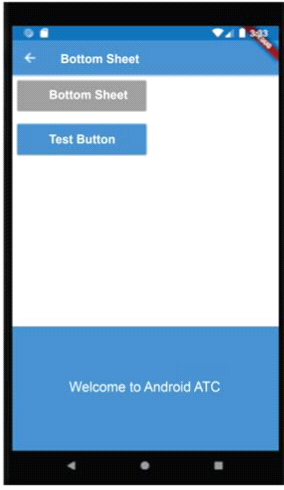
Which of the following choices about the type of this Bottom Sheet Widget is correct?
Question: 2
The image in this question includes a Flutter app interface which uses three tabs to navigate the app content.
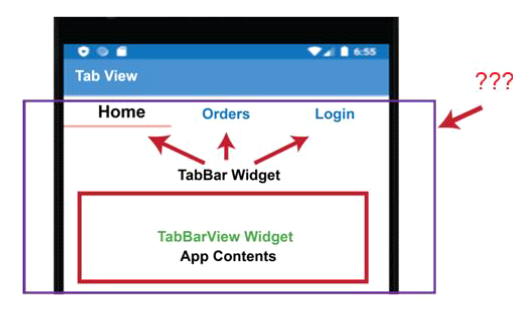
Which of the following choices is the parent widget for the TabBar and TabBarView widgets?
Question: 3
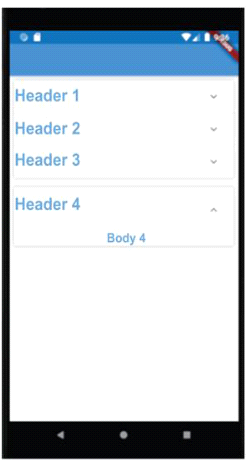
Which type of Flutter widgets is used in designing this app interface ?
Question: 4
In Flutter, AlertDialog Widget is similar to a small interface which appears for a few seconds at the bottom of the app user interface when the app user takes a specific action such as clicking a button.
Question: 5
Fill in the blank with the correct answer that completes the following sentence.
If you have any error in your Dart code of your Flutter app, the .......................... at the status bar of your
Android Studio displays the error description and also displays the line of the code on which the error is.
Also, in most cases the description field in this console gives you an idea about the reason of the error.
What is the name of this console?
Other Android Certification Exams
Android Applications UI/UX Design and Monetization Techniques
Android Security Essentials
Android Application Development v8